LivingMeeting vs Fathom
Fathom is a well-made notetaker with a generous free tier. LivingMeeting is a different category: the room, not the recorder.
Fathom is an AI notetaker that joins calls on Zoom, Google Meet, and Microsoft Teams to record, transcribe, and summarize them.
The recap was never the hard part.
Fathom is genuinely good at the thing it does — fast, clean summaries you do not have to edit. But a better recap does not fix the failure mode most teams actually have: the decision was made, nobody owned it, the document never got written, and the follow-up slipped a week. Livi is in the room precisely so those four things happen while people are still present, which is not something a recorder joining from outside can do.
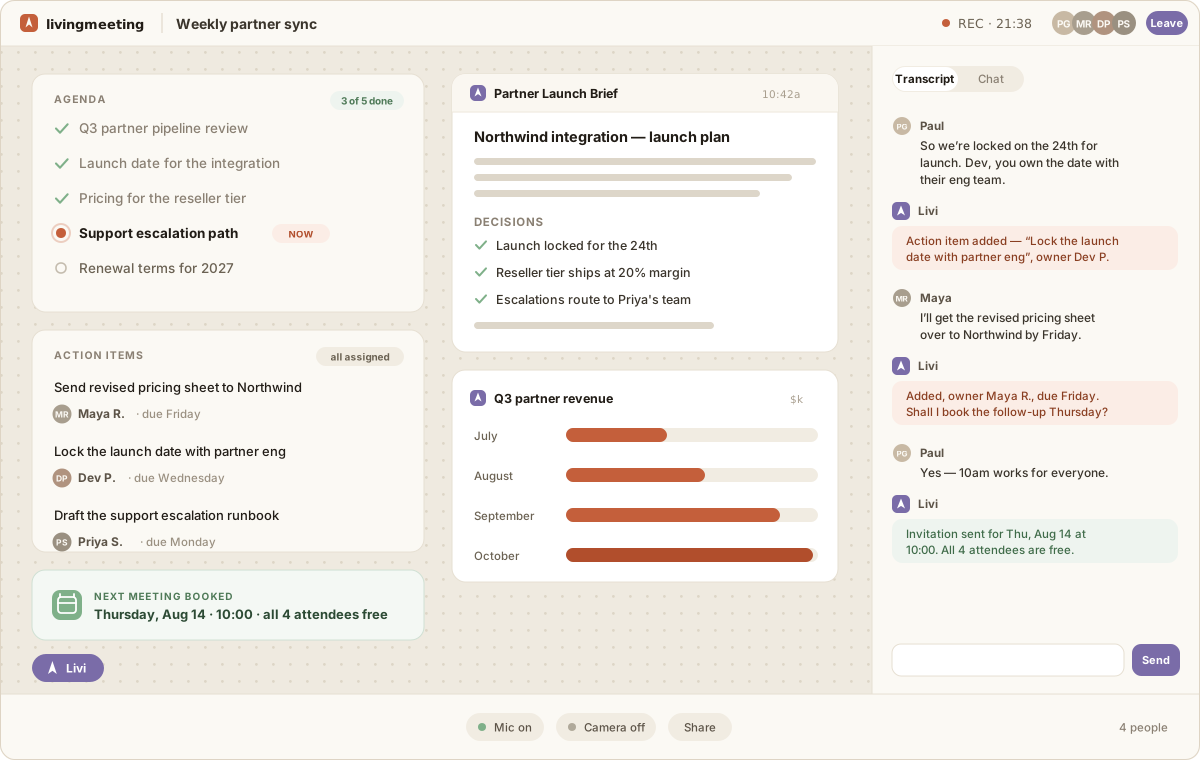
Side by side
| Dimension | Fathom | LivingMeeting |
|---|---|---|
| Where the AI sits | Fathom joins a call hosted somewhere else — Zoom, Meet, or Teams — as an additional participant. | LivingMeeting is the call. Video, agenda, transcript, canvas, and Livi are one room, so Livi acts on the meeting instead of observing it. |
| What you get out | A transcript and a written summary of what was said. | The same record, plus the work itself: documents, sheets, charts, and diagrams built on the shared canvas during the conversation. |
| When the work happens | After the call, from the recording. | During the call, in front of everyone, while people can still correct it. |
| Who owns the follow-up | Action items are extracted into notes for someone to assign later. | Action items get a named owner in the room, visible to everyone before anyone leaves. |
| The next meeting | Booked separately, in your calendar app, after the fact. | Livi reads connected Google and Outlook calendars, accounts for working hours, gathers live availability, and sends the invite before the room closes. |
| Next week's context | A folder of past summaries to re-read. | Recurring rooms roll forward: last time's decisions, open action items, and artifacts are already on the table when the room opens. |
| Meeting audio | Recording and retention policies vary by plan and configuration. | Audio is streamed for transcription and discarded after processing. Transcripts and artifacts stay in your workspace until you delete them. |
Descriptions of Fathom reflect how it positions itself publicly as of August 2026 and describe category-level architecture, not a feature-by-feature audit. Check their site for current details.
When Fathom is the better choice
Genuinely — if any of these is you, Fathom will serve you better than we will, and we would rather say so than win the wrong customer.
- You want a free, low-friction notetaker on calls you do not host.
- Sales calls on a customer's Zoom link are the bulk of your meetings.
- Summaries and highlight clips are the deliverable you actually need.
Switching from Fathom
Is LivingMeeting an alternative to Fathom?
It replaces the job, not the mechanism. Fathom is an AI notetaker: it joins a meeting happening on another platform and writes up what was said. LivingMeeting is the meeting room itself, with the AI teammate inside it, so the output is the actual work — a document, a chart, an owned action item, a scheduled follow-up — rather than a record of the discussion. Teams usually move to LivingMeeting because summaries were never the bottleneck; follow-through was.
Can I use LivingMeeting and Fathom together?
Yes. They do not conflict — Fathom covers calls that happen on Zoom, Meet, or Teams, and LivingMeeting hosts the meetings you want to produce something. Many teams start by moving one recurring meeting, usually the one that keeps re-deciding the same things, and leave everything else where it is.
Do we have to change how we meet?
You send a LivingMeeting link instead of a Zoom or Meet link, and guests can join with just a display name — no account required. Calendars stay where they are: Livi connects to Google Calendar and Outlook, so invitations and availability keep working the way your team already expects.
What does LivingMeeting cost?
Free is $0 forever — three meetings a month, up to 30 minutes each, with Livi, the live canvas, the agenda, and the recap. Team is $10 per member per month for unlimited meetings up to 60 minutes. Business is $20 per member per month and adds branding controls and Google or Microsoft SSO. Enterprise is self-hosted and quoted per deployment.
Fathom has a free plan. Does LivingMeeting?
Yes — $0 forever, with three meetings a month at up to 30 minutes each. That includes the parts that make LivingMeeting different: Livi in the room, the live canvas, the tracked agenda, named action items, and calendar sync. It is a real trial of the idea rather than a preview with the interesting half removed.
Other comparisons
Start with the one that keeps re-deciding things.
Three free meetings a month, no credit card. Keep Fathom on everything else while you find out.
Start free